
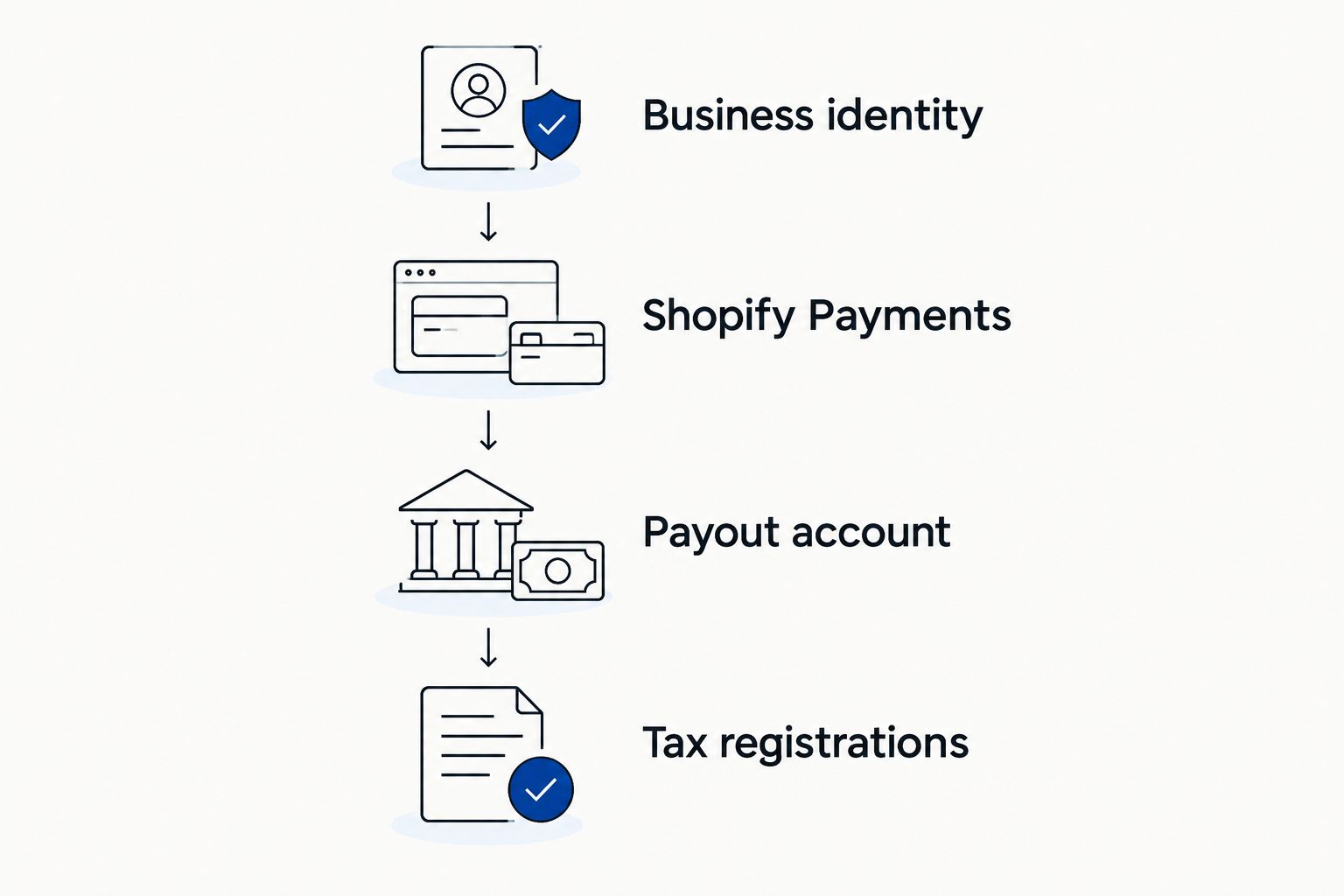
Instead of repeatedly re-entering business details, use your EIN to set up Shopify Payments with information that matches your IRS records, then connect your payout account and check your California permit requirements. You can create a Shopify store before entering an EIN; the EIN belongs in the business verification process, not a separate seller-account registration.
- To use EIN to set up Shopify seller account details, enter it during Shopify Payments business verification.
- Shopify Payments can require personal identity information alongside your business EIN.
- Match your legal business name to IRS records, not just your storefront name.
- Pro Business Solutions suits first-time Los Angeles owners seeking hands-on business paperwork guidance.
Why this matters
Your Shopify login, federal tax identity, and California seller's permit serve different purposes. Treating them as one registration creates confusion when payment verification asks for information your storefront does not display.
For your 2026 launch, build a consistent business record before entering payment details. Pro Business Solutions provides business-formation and EIN filing help, with 21+ years of local filing experience and personal support in English and Spanish.
Pro Business Solutions is best for first-time Los Angeles business owners who want hands-on business-formation guidance. The consultancy helps with paperwork; Shopify handles its own account and payment verification.
Before you start
- Gather your records: Have your IRS EIN confirmation, formation documents if applicable, legal business address, owner identification, and payout-account details ready. An EIN contains 9 digits; copy it from the IRS record rather than a handwritten note.
- Confirm your access: Use a Shopify account with permission to manage payment settings. Keep access to the email address receiving verification requests and to the bank account you intend to use for payouts.
- Resolve the naming gotcha: Your public store name can differ from your legal business name. A DBA does not create a separate legal entity, and an EIN does not replace personal identity checks.
If you have not formed the LLC or corporation you intend to operate, settle that first. The IRS instructs applicants to form a legal entity with their state before applying for that entity's EIN.
Business identity: choose the right starting point
Shopify calls the business selling through its platform a merchant. You are creating a store and configuring payment processing, rather than applying for a marketplace seller account that uses an EIN as its login.
For a 2026 setup, use your actual legal structure. Do not select a corporation simply because you have an EIN, and do not select an individual business solely because you work alone.
| Business structure | Best for | Practical advantage | Limitation to understand |
|---|---|---|---|
| Sole proprietorship | An owner operating without a separate legal entity | Business details follow the owner's existing legal identity | An EIN does not turn the business into an LLC or corporation |
| Single-member LLC | An owner who has formed an LLC | Formation records identify the legal entity | Federal tax treatment and legal structure are not interchangeable |
| Corporation | A business already incorporated | Incorporation records establish the corporation's legal name | Owner and representative verification can still be required |
Choose the structure you have, not the structure you plan to form later. If an LLC has a tax election, use the payment provider's instructions for that situation rather than guessing from the entity's name.
Business record preparation
Assemble your identity record
- Open your IRS EIN confirmation and locate the legal name and EIN. Keep the complete document available in case verification requires supporting evidence.
- Compare that name with your formation documents, where applicable. Separate the legal name from any DBA or customer-facing store name.
- Write down your business address, representative's legal name, and intended payout-account details. Identify any old address or name that needs correction before submitting inconsistent records.
Expected result: You have one reference record for entering business information, with any discrepancies identified before payment setup.
Do not apply for another EIN just because you are opening Shopify. The IRS generally does not require a new EIN merely because a business changes its name or address; ownership and structural changes require a separate review.
Keep identity documents out of shared planning spreadsheets. A checklist can track whether a document is ready without exposing its contents to everyone helping launch the store.
Shopify Payments configuration
Enter your business details
- In the Shopify admin, open Settings, then Payments. Locate Shopify Payments and open the setup action shown for your account.
- Select your actual business type and complete the requested business information. Where the form requests an EIN, enter the number assigned to the business you are registering.
- Enter the legal business name from your supporting records. Keep your storefront name or DBA in the separate customer-facing field when one is provided.
- Complete the requested personal, ownership, and representative information. Submit any verification documents through Shopify's designated upload process, not by sending them to an unfamiliar email address.
Expected result: Shopify Payments has your submitted business profile and shows either further requirements, a review status, or an enabled payment account. Submission alone does not establish that every payment feature is ready.
Shopify's setup screens depend on country, business type, and account status. In 2026, follow the requirements displayed in your own admin rather than trying to reproduce every field from someone else's screenshot.
An EIN identifies a business for federal tax purposes. It does not establish who is controlling the payment account, which explains why Shopify Payments can request personal identity information too.
Payout and checkout configuration
Connect and check payments
- Follow the payout-account instructions within Shopify Payments. Enter the requested banking information carefully and check that the account meets Shopify Payments' requirements for your country.
- Return to Settings and Payments to review outstanding notices. Complete identity or document requests before treating the payment setup as finished.
- Use Shopify's documented testing process to check checkout. Review order confirmation and payment status, then disable any payment test mode before accepting real customer orders.
Expected result: You know whether checkout accepts the intended payment method, whether an order appears correctly, and whether any account requirements remain unresolved.
For a practical launch check, run 2 test orders: one ordinary purchase and one purchase that tests your configured shipping or tax behavior. These are suggested checks, not a Shopify requirement. Follow the testing method appropriate to your payment configuration.
A successful test order does not prove that payouts have reached your bank. Check payout status separately, and never interpret a checkout success message as evidence that a California permit has been issued.
California tax and permit configuration
Review your selling obligations
- Identify what you sell and where the business operates. California generally requires a seller's permit when you engage in business in the state and sell tangible personal property ordinarily subject to sales tax.
- Determine whether your business needs registration with the California Department of Tax and Fee Administration. Keep the seller's permit record separate from your IRS EIN confirmation.
- In Shopify, open Settings, then Taxes and duties. Review the applicable regional settings and enter registration information where requested, based on your actual registrations.
- Check city-level business registration requirements for your operating address. A Los Angeles County address does not establish whether your business falls inside the City of Los Angeles or another local jurisdiction.
Expected result: Your payment identity, tax registration records, and store tax settings have been reviewed as separate tasks rather than treated as one automatic setup.
Entering an EIN does not obtain a California seller's permit. For a 2026 launch involving taxable goods, review the seller's permit guide for e-commerce sellers before assuming the tax-settings screen completes registration.
Updating an existing Shopify store after getting an EIN
An existing store needs a records review, not automatically a new store. Start by deciding whether you obtained an EIN for the same business or formed a different legal entity.
- Compare the existing payment profile with the new IRS record. Identify changes to the legal name, entity, ownership, address, or tax identification number.
- Open Settings, then Payments, and review the available management options for Shopify Payments. Update editable information only when it accurately represents the same business.
- Contact Shopify Support when the required legal-entity or ownership change is not available in the admin. Ask which records and verification steps apply before changing unrelated settings.
- Review payout-account ownership and California registrations separately. Updating the store's tax identifier does not update IRS, bank, county, or state records.
Expected result: The existing store reflects the correct business, or you have a defined support process for the entity change.
For example, moving from a sole proprietorship to an LLC involves more than replacing a number. Use your formation and tax records to establish what changed, then follow Shopify's instructions for that change.
Troubleshooting
The EIN or legal name fails verification
Compare the entry with the IRS record, including the legal name rather than the store brand. Check for transposed digits and confirm that you submitted the EIN belonging to the business on the account. If verification still fails, follow the document request or contact Shopify Support; repeated guesses do not correct an underlying records mismatch.
Shopify asks for personal information despite the EIN
Complete the requested representative or owner verification through the Shopify admin. A business identifier and a person's identity answer different questions. Do not replace a personal identification field with the EIN unless the field explicitly allows it.
Checkout works, but payouts need attention
Read the payout notice in the admin and confirm the banking details. Resolve document requests or account restrictions through Shopify's instructions. Keep order testing separate from payout troubleshooting so you do not mistake a functioning checkout for a fully verified payment account.
The store name differs from the paperwork
Keep the legal name in the legal business field and the public name in the appropriate storefront or customer-facing field. If you use a DBA in Los Angeles County, check the Los Angeles County DBA filing guide rather than treating a Shopify name change as a county filing.
Customize your workflow
Build a launch folder with separate areas for IRS records, formation documents, California registrations, and payment-provider requests. Keep a simple task list showing what is submitted, what needs action, and which organization controls the next step.
For your 2026 launch, resolve business-record questions before repeatedly editing payment settings. Pro Business Solutions offers formation, EIN filing, seller's permit, DBA, and tax-preparation services in one place, backed by its owner-confirmed 100% error-free service promise. It is a business consultancy and notary service, not a law firm.
That support suits owners who want help understanding paperwork in English or Spanish. Shopify account decisions and technical payment issues still belong with Shopify; consult an attorney when you need legal advice.
Get help organizing your business paperwork
Ask about formation, EIN filing, permits, and personal support in English or Spanish.
FAQ
Can I use an EIN to set up a Shopify seller account?
Yes, you can enter your business EIN when Shopify Payments requests it during business verification. Creating the store itself is separate from submitting tax and identity information for payment processing.
Do I need an LLC before opening a Shopify store?
No, an LLC is not required simply to open a Shopify store. Enter the business structure you actually operate, and obtain the registrations required for your activities and location.
Can I use my EIN instead of my Social Security number everywhere?
No, an EIN does not replace every personal identity requirement. Shopify Payments can request information about the owner or account representative even when the business has an EIN.
Does getting an EIN give me a California seller's permit?
No, an EIN is a federal tax identifier, while a California seller's permit is a separate state registration. Review your obligations with the California Department of Tax and Fee Administration based on what you sell and how you operate.
Can I use a DBA as the legal business name in Shopify Payments?
Use the legal business name requested by the verification form, not automatically your DBA. A DBA is a business name registration rather than a separate legal entity, so keep it distinct from the underlying owner or entity.
Should I get another EIN for a second Shopify store?
A second Shopify store alone is not a reason to obtain another EIN. EIN requirements depend on the business's ownership and structure, so review IRS guidance before applying again.
Can Pro Business Solutions help with the paperwork before Shopify setup?
Yes, Pro Business Solutions provides business-formation, EIN filing, seller's permit, and related paperwork services. Personal support is available in English and Spanish; Shopify handles its payment-account verification and technical account requirements.
One last thing
Save the original EIN confirmation, not just the number. The document connects the identifier to a legal business name, which makes it more useful than a number copied into a notes app. Keep it secure and use it as your reference whenever a legitimate payment provider requests business verification.