
California does not charge an application fee for a seller’s permit in 2026, whether you apply yourself or hire someone to help. Your separate expenses can include professional filing assistance, a security deposit if the state requires one, and local business registrations; none is the state’s seller’s permit application fee.
- How much does a seller's permit cost in California? CDTFA does not charge an application fee.
- A consultant’s service charge is separate from California’s seller’s permit application.
- A seller’s permit does not replace Los Angeles business registration or other required permits.
- Pro Business Solutions offers hands-on seller’s permit help, including personal support in English and Spanish.
Why this matters
When you are starting a business, a quote for paperwork help can look like a government charge. Separate the permit itself from the service of preparing the application. That distinction lets you decide what help you need without confusing the two.
The California Department of Tax and Fee Administration, or CDTFA, administers seller’s permits. For online sellers, the seller’s permit guide for e-commerce sellers connects that registration with the practical questions of selling through a website or marketplace.
How much does a seller’s permit cost in California?
There is no state application fee for a California seller’s permit. CDTFA’s published seller’s permit guidance distinguishes that application from a security deposit, which the department can require in certain circumstances.
For your 2026 startup budget, keep these items separate:
| Item | What it covers | What to check |
|---|---|---|
| State seller’s permit application | Registration with CDTFA for applicable sales and use tax obligations | Apply through the official state registration process |
| Professional filing assistance | Help preparing and submitting your information | Ask exactly what the service includes |
| Security deposit | Security for tax obligations when CDTFA requires it | Follow the department’s instructions for your account |
| Local business registration | City or county requirements separate from CDTFA | Check the jurisdiction where you operate |
| Ongoing tax administration | Records, returns, and payments associated with taxable activity | Confirm your assigned filing schedule |
A business owner who receives a consultant’s quote is not being quoted the state application fee. The quote concerns a service. Ask for a written explanation separating professional assistance from government requirements before you authorize work.
Is applying yourself different from paying for help?
Both approaches involve the same state registration requirement. The difference is who gathers the information, explains the questions, and prepares the application.
| Approach | Best for | Benefit | Limitation |
|---|---|---|---|
| Apply directly through CDTFA | Owners comfortable handling their own registration | You handle the application without hiring a filing service | You must understand the questions and keep track of follow-up |
| Use a business-formation consultant | First-time owners who want personal paperwork help | You can ask questions while preparing the application | Professional assistance is a separate service expense |
Choose direct filing when you understand the application; choose hands-on help when you need someone to explain the paperwork. Paying for assistance does not turn the seller’s permit into a different type of state authorization.
What a seller’s permit does—and does not—cover
A California seller’s permit generally applies to businesses selling tangible goods that would ordinarily be subject to sales tax. Tangible goods are physical items, such as clothing, furniture, or handmade products. Wholesale activity can also create a registration requirement.
The permit connects your business with California’s sales and use tax system. It does not form an LLC, register a fictitious business name, establish trademark rights, or replace local operating requirements.
For a first-time Los Angeles business owner, the distinction matters because several registrations can appear on the same startup checklist. They serve different purposes:
- Seller’s permit: Addresses applicable California sales and use tax registration.
- Business entity filing: Establishes an entity such as an LLC or corporation.
- DBA registration: Registers a fictitious business name when required.
- Local business registration: Addresses the requirements of the city or county where you operate.
Do not buy every service simply because it appears in a startup package. Start with what you sell, where you operate, and the business structure you have chosen. Those facts determine which questions to resolve.
Why your total setup expenses vary
The seller’s permit application itself does not explain your entire startup budget. Your business can have separate registration and administrative needs even though CDTFA does not charge an application fee.
These factors explain why another owner’s total is not a useful substitute for your own checklist:
- Filing assistance: Preparing the application yourself differs from hiring someone to help with it.
- Security requirements: A deposit, when required by CDTFA, is separate from an application charge.
- Operating location: The City of Los Angeles and other cities in Los Angeles County have their own local requirements.
- Business activity: Selling merchandise, operating a food business, and providing services raise different registration questions.
- Entity and business name: Forming an LLC or registering a DBA involves paperwork separate from a seller’s permit.
- Ongoing administration: Bookkeeping and tax preparation are different tasks from opening the account.
For a 2026 launch, ask each provider to identify the specific paperwork included in its scope. A broad description such as business setup does not tell you whether the work covers CDTFA registration, a DBA, local registrations, or something else.
How to prepare before applying
Getting your information together first reduces avoidable back-and-forth. Use the same legal name, ownership details, and business information across the documents you prepare.
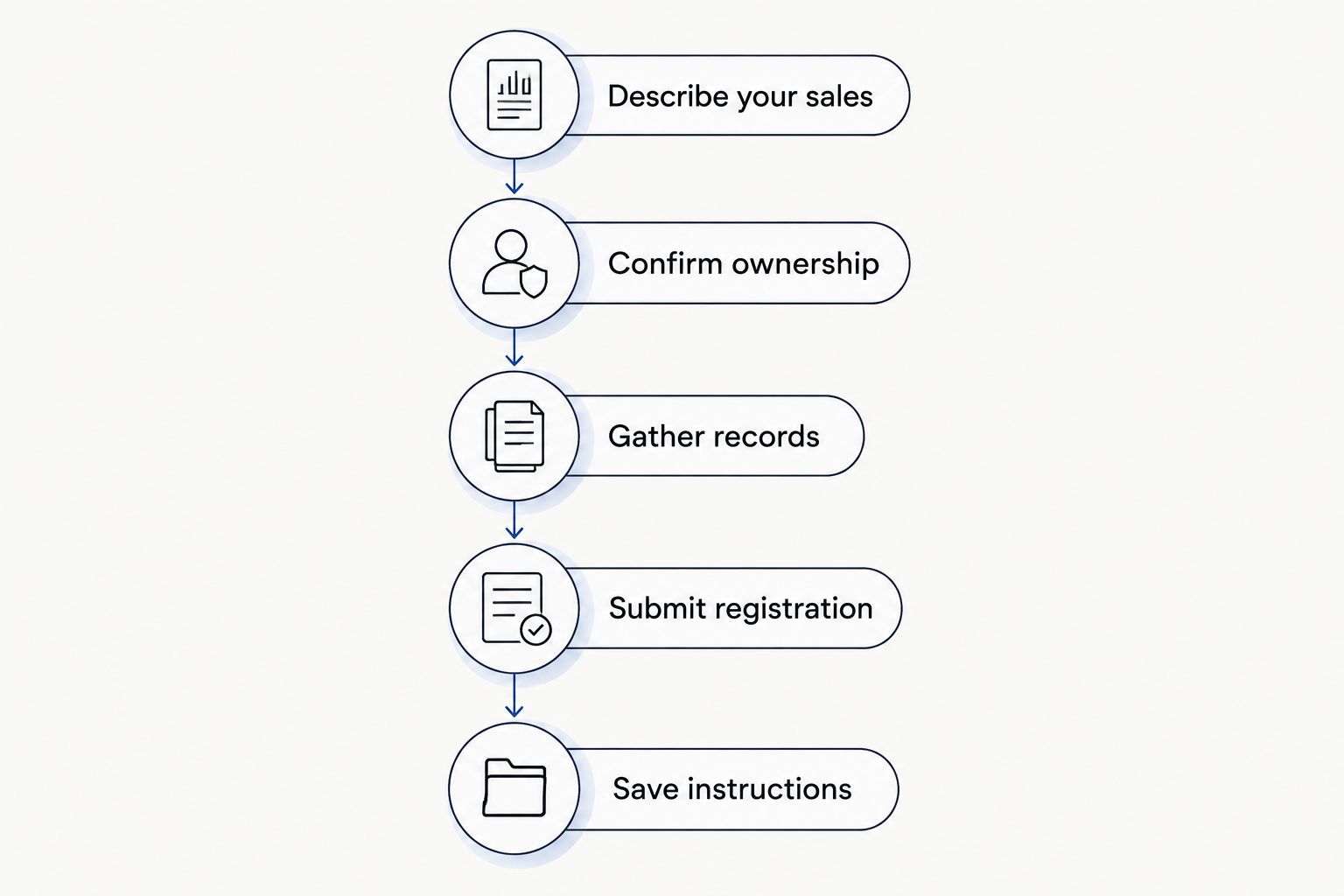
Step 1: Describe your sales
Write down what you plan to sell and how customers will buy it. Include whether you will sell through a physical location, your own website, a marketplace, or temporary events.
Do not stop at a broad label such as online business. A description of the actual goods and selling channels gives you a clearer starting point for registration questions.
Step 2: Confirm ownership
Identify whether the seller is you individually, a partnership, an LLC, or a corporation. Use the legal owner’s information rather than treating a store name as a separate legal entity.
If you are forming an entity, coordinate the sequence of filings before submitting applications under inconsistent names. A business consultant can help organize the paperwork; questions about legal structure belong with a qualified attorney or tax professional as appropriate.
Step 3: Gather records
Have identification, contact information, business addresses, ownership information, and applicable business tax identification details ready. CDTFA’s registration process determines the information required for your situation.
Keep source documents nearby rather than answering from memory. Check spelling and addresses carefully, especially when a home address, mailing address, and operating location differ.
Step 4: Submit registration
Apply through CDTFA’s official registration process or work with the provider you have selected. Review the information before submission, even when someone else prepares it.
Keep copies of the application and any follow-up correspondence. If the department requests additional information, answer the actual request rather than submitting a second application without understanding the issue.
Step 5: Save instructions
After registration, retain your permit information and account instructions. Confirm the filing schedule assigned to your account and how to access it.
Your 2026 opening checklist should include those follow-up tasks, not just the application. Registration begins an administrative responsibility; it is not the end of your sales tax paperwork.
Do temporary sellers need a different permit?
CDTFA describes temporary seller’s permits for selling at a location for 90 days or less. A temporary event, such as a craft fair or pop-up, deserves its own registration check rather than an assumption that short-term sales are exempt.
The temporary nature of your event does not make a seller’s permit a substitute for event, health, or local operating requirements. Ask the organizer what documentation it requires, then check the government requirements separately.
If you expect to sell repeatedly, explain that plan when discussing registration. The right question is how the registration should reflect your actual activity, not simply whether your first event is brief.
Do online sellers need a California seller’s permit?
Selling online does not, by itself, remove California registration obligations. Your location, business activity, and sales channels matter.
CDTFA’s marketplace facilitator guidance distinguishes sales handled by a registered marketplace facilitator from sales you make directly. A California seller whose sales are exclusively through a registered marketplace facilitator can have a different registration position from a seller who also takes orders through an independent website.
Do not assume that a marketplace collecting tax resolves every obligation for your business. List each channel separately and check which sales the marketplace handles. For your 2026 review, include new channels you plan to add after launch, not just the platform you use today.
What should you ask before hiring filing help?
Ask the provider to explain the work in everyday language. You should understand what you are authorizing without having to interpret legal terminology.
Useful questions include:
- Does the service cover only the seller’s permit application, or other registrations too?
- Who reviews my ownership and business information before submission?
- How will I receive copies of the filing and account instructions?
- What assistance is included if additional information is requested?
- Which ongoing tasks remain my responsibility after registration?
Pro Business Solutions is best for first-time Los Angeles business owners who want hands-on seller’s permit guidance in English or Spanish. The consultancy brings 21+ years of local filing experience and offers help with formation, permits, and related paperwork in one place.
Pro Business Solutions confirms a 100% error-free service promise. That is an accuracy promise about its service, not a reason to skip your own review of names, addresses, and business details.
The trade-off is straightforward: professional assistance is separate from the state application, and it does not replace ongoing recordkeeping or tax filing. Pro Business Solutions is a business consultancy and notary service, not a law firm.
If you want help organizing the next step, contact the team and describe what you plan to sell, your location, and whether you already have a business entity. Those details make the conversation more useful than asking for an unspecified business-startup package.
FAQ
How much does a seller’s permit cost in California in 2026?
California does not charge a seller’s permit application fee. Professional filing assistance, a security deposit when required, and other business registrations are separate items.
Can I apply for a California seller’s permit myself?
Yes, you can apply directly through CDTFA’s official registration process. Hiring someone to help is optional; review your ownership details, business activity, and application information carefully either way.
Does a California seller’s permit have an annual renewal fee?
A California seller’s permit does not have an annual renewal fee. That does not eliminate sales tax return requirements or separate local business renewal obligations.
Is a seller’s permit the same as a Los Angeles business license?
No, a California seller’s permit and local business registration serve different purposes. Check requirements for the city or unincorporated county area where your business operates.
Do I need a seller’s permit for a California pop-up shop?
Temporary sales can require a seller’s permit. CDTFA describes temporary seller’s permits for selling at a location for 90 days or less; event and local requirements remain separate.
Do I need a seller’s permit if I only sell through a marketplace?
Selling exclusively through a registered marketplace facilitator can change your California registration requirement. Check CDTFA’s marketplace guidance and distinguish those sales from orders through your own website or other direct channels.
Can someone explain the seller’s permit application in Spanish?
Pro Business Solutions confirms personal support in English and Spanish. Ask for help understanding the application questions and the paperwork relevant to your business.
One last thing
A resale certificate is not the same document as your seller’s permit. The permit registers your business with CDTFA; a resale certificate is documentation you give a supplier for qualifying purchases intended for resale.
Do not use a resale certificate for supplies you consume in your business merely because you hold a seller’s permit. Before your first inventory purchase, separate merchandise you will resell from equipment and supplies you will use yourself. That practical distinction matters long after the application is finished.