
Instead of manually calculating sales tax on every sale, complete your seller's permit QuickBooks sales tax setup by matching your California registration, configuring QuickBooks Online, and checking transactions before you send them. This 2026 workflow connects the paperwork to your bookkeeping without treating a permit, a tax calculation, and a filed return as the same thing.
- Complete seller's permit QuickBooks sales tax setup using your CDTFA registration, business locations, and filing schedule.
- QuickBooks Online sales tax settings do not replace California seller's permit registration or return filing.
- Separate direct sales from marketplace-collected tax to prevent duplicate entries.
- Pro Business Solutions is best for first-time Los Angeles owners seeking hands-on seller's permit filing guidance.
Why this matters
Your California seller's permit establishes your sales tax account with the California Department of Tax and Fee Administration, or CDTFA. QuickBooks Online records transactions and calculates sales tax using your settings and transaction details. Neither task replaces the other.
Pro Business Solutions helps with seller's permits, business formation, and related paperwork, with 21+ years of local filing experience. Personal support is available in English and Spanish when unfamiliar terms make the process stressful.
Get the registration facts right before you configure the software. A wrong business address or tax category can affect later transactions, even when an invoice looks professional.
This guide covers California businesses using QuickBooks Online in 2026. QuickBooks Desktop has a different setup process; do not follow these menu instructions in the desktop product.
Before you start
- Account access: Have administrator access to your QuickBooks Online company and access to your CDTFA account. Keep your seller's permit details, registered business name, business locations, and CDTFA-assigned filing frequency nearby.
- Sales information: Prepare your product list, pickup and shipping arrangements, customer exemption documentation, and a list of sales channels. Identify who collects tax on each channel before importing orders.
- The easily missed issue: Marketplace-facilitated sales need different bookkeeping treatment from direct sales when the marketplace collects and remits the tax. Do not apply a second customer tax charge simply because an imported order appears in QuickBooks.
Keep 3 records together: your registration confirmation, your assigned filing schedule, and your initial settings checklist. Use the CDTFA account—not an old calendar reminder—to confirm what returns are due.
Registration and sales-channel records
Your first configuration unit is the source information behind the software. Settle these facts before choosing tax settings.
- Confirm your entity. Match the legal business name and ownership information to your CDTFA registration. A DBA is a business name, not a separate entity or a replacement for a seller's permit.
- Confirm your locations. Record where you operate, store inventory, hand goods to customers, and ship orders. Distinguish the business address from a customer's delivery address.
- Confirm your filing assignment. Find the filing frequency and reporting instructions in your CDTFA account. Do not choose a schedule because another business uses it.
- Map your channels. Mark each channel as direct sales or marketplace-facilitated sales, then document who collects and remits the tax.
For 2026 transactions, use current CDTFA guidance on California sales and use tax and district taxes. California's statewide base rate is 7.25%, but district taxes can increase the applicable rate. Do not enter 7.25% as a universal rate for every Los Angeles County sale.
Expected result: You have one consistent business identity, a confirmed filing schedule, and a clear tax-collection responsibility for each sales channel.
Choose the right transaction workflow
These workflows serve different sales channels. Neither is a substitute for deciding which transactions belong on your California return.
| Workflow | Best for | Advantage | Limitation |
|---|---|---|---|
| Direct-sale tax calculation | Sales where your business is responsible for collecting tax | Keeps the customer's charge and recorded tax connected | Depends on correct addresses, product categories, and customer status |
| Marketplace-collected tax reconciliation | Orders where a marketplace facilitator collects and remits tax | Separates marketplace tax from amounts your business collects | Requires careful import mapping and return reporting review |
A business selling both at a local counter and through a marketplace needs both workflows. Treating every order identically creates confusion between customer charges, marketplace deductions, and your own tax liability.
QuickBooks Online sales tax settings
Configure the tax agency and filing details from your registration records, not from memory. These instructions use QuickBooks Online's sales tax workspace; navigation placement differs between interface layouts.
- Open Taxes, then Sales tax. If your company has not completed sales tax setup, follow the setup prompts before creating taxable invoices.
- Confirm the business address used for tax calculations. Use the actual business information that applies to your operations; do not substitute a mailing address without checking its treatment.
- Open Sales tax settings. Review the California tax agency information and compare the filing frequency with your CDTFA assignment.
- Review any additional agencies already listed. Add registrations only when your business has the corresponding tax obligation; a customer's out-of-state address alone is not an instruction to register everywhere.
- Save the settings and reopen them. Compare the saved information with the registration records you gathered earlier.
Expected result: The California agency, business address, and filing frequency reflect your actual account information.
QuickBooks Online's calculations are useful, but the settings are not a legal determination of where your business must register. Ask a qualified tax professional about tax obligations outside California rather than guessing from a software prompt.
Product and customer tax details
The next configuration unit controls what you sell and who buys it. An accurate agency setup cannot correct an item assigned to the wrong tax category.
- Open Settings, then Products and services. Choose Edit for each item you use on sales forms.
- Review the item's Sales tax category. Select the category that describes the actual product or service, rather than assuming all items have the same treatment.
- Select Save and close after reviewing each item. Keep a short note explaining any classification that needs a tax professional's review.
- Review customer records and exemption documentation. Apply exempt treatment only when the transaction qualifies and you have the required supporting records.
- Check the addresses used on the transaction. For shipped orders, confirm the delivery address; for pickup transactions, confirm that the sales form reflects the actual fulfillment arrangement.
Expected result: Your regularly sold items have deliberate tax classifications, and customer exemptions are supported rather than assumed.
Do not classify a product as exempt merely because another seller did not charge tax. Product taxability, customer status, and the transaction's circumstances need their own review.
Test transactions and return records
Finish the 2026 setup with controlled checks before relying on live invoices. A saved setting is not proof that an imported order or customer charge is correct.
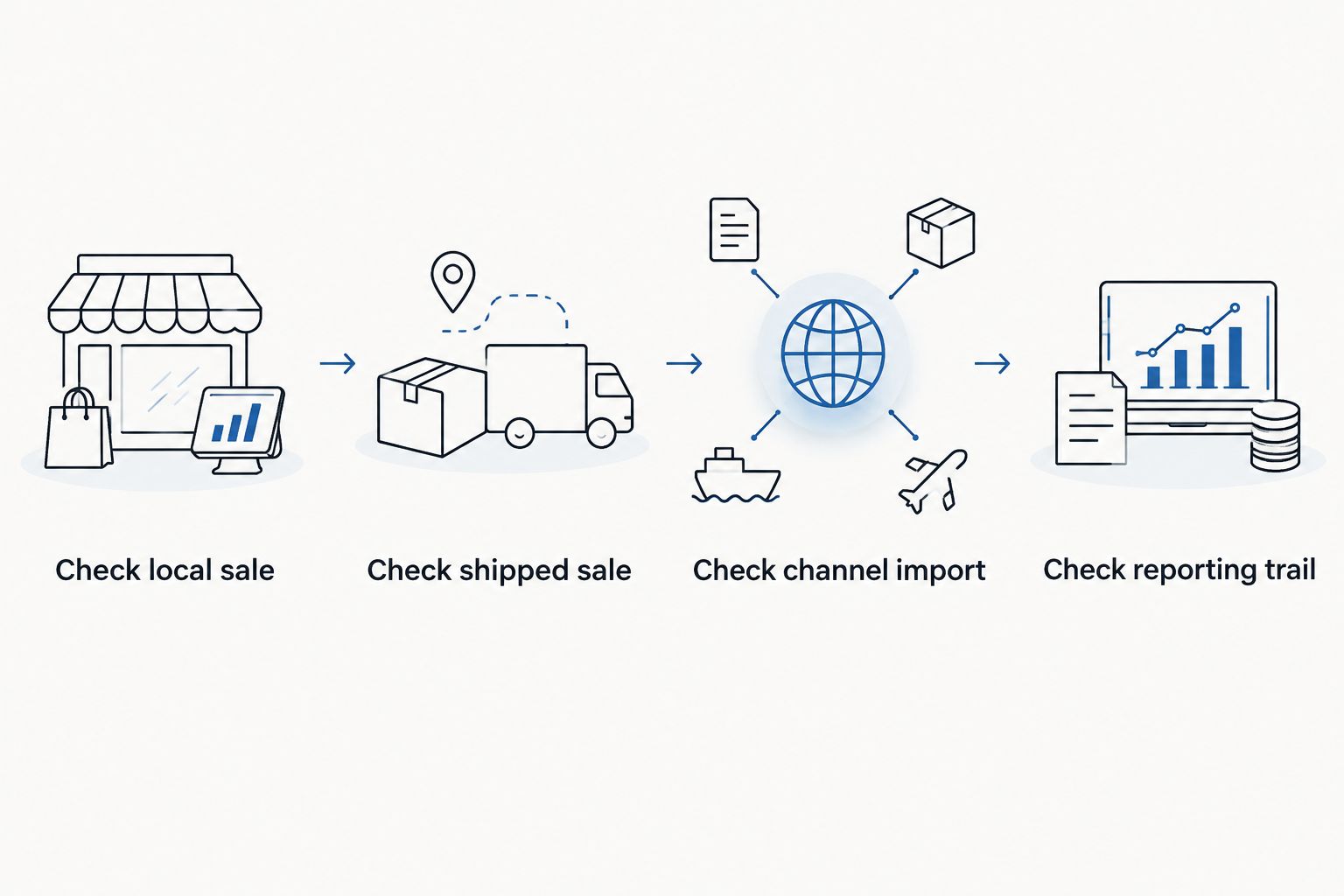
- Check a local sale. Prepare an unsent test transaction using a real item category and the correct pickup or delivery details. Inspect the tax calculation and its supporting details.
- Check a shipped sale. Prepare a second unsent transaction with a different delivery address. Compare the result with CDTFA's applicable address-based rate information and district-tax guidance.
- Check a channel import. Inspect a marketplace order's sales amount, tax, fees, refunds, and payout mapping. Make sure marketplace-collected tax does not become a second customer charge or an unexplained liability.
- Check the reporting trail. Open Taxes, then Sales tax, and review the reporting period. Compare recorded transactions with your source records before preparing the return.
Expected result: You can explain the tax treatment of 2 test transactions and trace an imported order back to its source.
Do not send test invoices to customers. Remove test transactions afterward, and confirm that they have not inflated your sales or tax reports.
A bookkeeping entry showing a payment is not evidence that CDTFA received a return. Retain the government's filing confirmation and payment confirmation with the supporting reports.
Second workflow: when a sale changes
A refund, corrected delivery address, or changed product can affect a previously recorded sale. Update the existing transaction trail instead of creating an unrelated adjustment that nobody can explain later.
- Find the original sale and identify whether it came from a direct transaction or a marketplace import.
- Use the appropriate correction or refund process for that source. Preserve the connection between the original sale and the change.
- Review the revised tax details. If an integration imports the correction, confirm that you have not also entered it manually.
- Check the reporting period affected by the change. If you already filed that period, ask your tax preparer how the correction belongs on your records and return.
Expected result: The customer transaction, channel record, and tax report describe the same event.
This variant matters when you add a new selling channel in 2026. Test an original order and its refund together before importing a larger batch; a clean sale import does not prove the refund mapping is correct.
Troubleshooting
The tax looks wrong for a Los Angeles sale
Check the fulfillment location, delivery address, product category, and customer exemption status before changing a rate. Los Angeles County is not a single universal tax-rate setting. Compare the actual transaction location with CDTFA's current rate information, then investigate any remaining difference.
A taxable item shows no sales tax
Review the item's tax category and the customer's tax status. Then confirm that the sales form uses the expected address and agency settings. Do not force a tax amount onto every invoice to hide a classification problem. Correct the cause and retest the transaction.
Marketplace tax appears in your amount due
Inspect the import mapping to see where the marketplace-collected tax was posted. Reconcile the order with the marketplace's settlement report and confirm the correct California reporting treatment. Do not delete tax-related records simply to make a balance disappear.
QuickBooks totals differ from the CDTFA return
Compare the same reporting period and accounting basis, then review marketplace sales, exempt sales, refunds, and manual adjustments. A return can require information beyond tax your business collected. Trace each difference to a transaction group before changing the return or your books.
A corrected order appears twice
Check whether both the integration and a manual entry recorded the correction. Keep the legitimate transaction and resolve the duplicate through your bookkeeping process. Review any reconciled payment or previously filed period before deleting or reversing entries.
Customize your workflow
Once the basic setup works, give each recurring task an owner: order imports, exemption records, reconciliation, return preparation, and filing confirmation. Put the CDTFA-assigned deadlines on a shared calendar and keep supporting documents with each reporting period.
Pro Business Solutions offers seller's permit filing help and tax preparation, with a 100% error-free service promise. For a first-time owner, hands-on guidance reduces the burden of interpreting unfamiliar paperwork; software configuration still requires its own transaction checks. The consultancy is not a law firm and does not provide legal advice.
Ask which paperwork and tax-preparation tasks fit your situation rather than assuming QuickBooks setup is included. That keeps the next step clear without adding services you do not need.
Ask about your seller's permit
Discuss California seller's permit paperwork and tax-preparation needs in English or Spanish.
FAQ
Do I need a seller's permit before setting up QuickBooks sales tax?
Complete any required California seller's permit registration before making sales that require it. You can prepare your bookkeeping beforehand, but QuickBooks setup does not register your business with CDTFA.
Does QuickBooks Online automatically file my California sales tax return?
Do not treat QuickBooks Online sales tax setup as a completed California return filing. Confirm the filing method you actually use and retain CDTFA's filing and payment confirmations.
What sales tax rate should I use for Los Angeles in 2026?
Use the rate and district-tax treatment applicable to the transaction, not a single rate for all of Los Angeles County. Check current CDTFA information using the relevant address and transaction details.
Should I charge tax again on marketplace orders?
Do not charge tax a second time when the marketplace facilitator has already collected the applicable tax. Check the order record, import mapping, and California reporting requirements before finalizing your books.
Can I mark all my customers as tax-exempt?
No. Apply exempt treatment only to qualifying transactions and retain the required documentation. A customer's request alone does not establish the correct tax treatment.
Can Pro Business Solutions help me understand the paperwork in Spanish?
Yes. Pro Business Solutions provides personal support in English and Spanish for its business paperwork services. Ask about seller's permit filing and tax-preparation support for your specific situation.
What should I do if a refund changes a return I already filed?
Ask your tax preparer how to report the correction for the affected period. Preserve the original sale, the refund record, and the filed return so the change can be traced.
One last thing
A correct tax calculation and a correct tax return are separate checkpoints. Before you close a reporting period, ask whether every sales channel is accounted for—not just whether the tax balance looks reasonable. Marketplace sales, refunds, and exempt transactions still need a clear reporting trail.