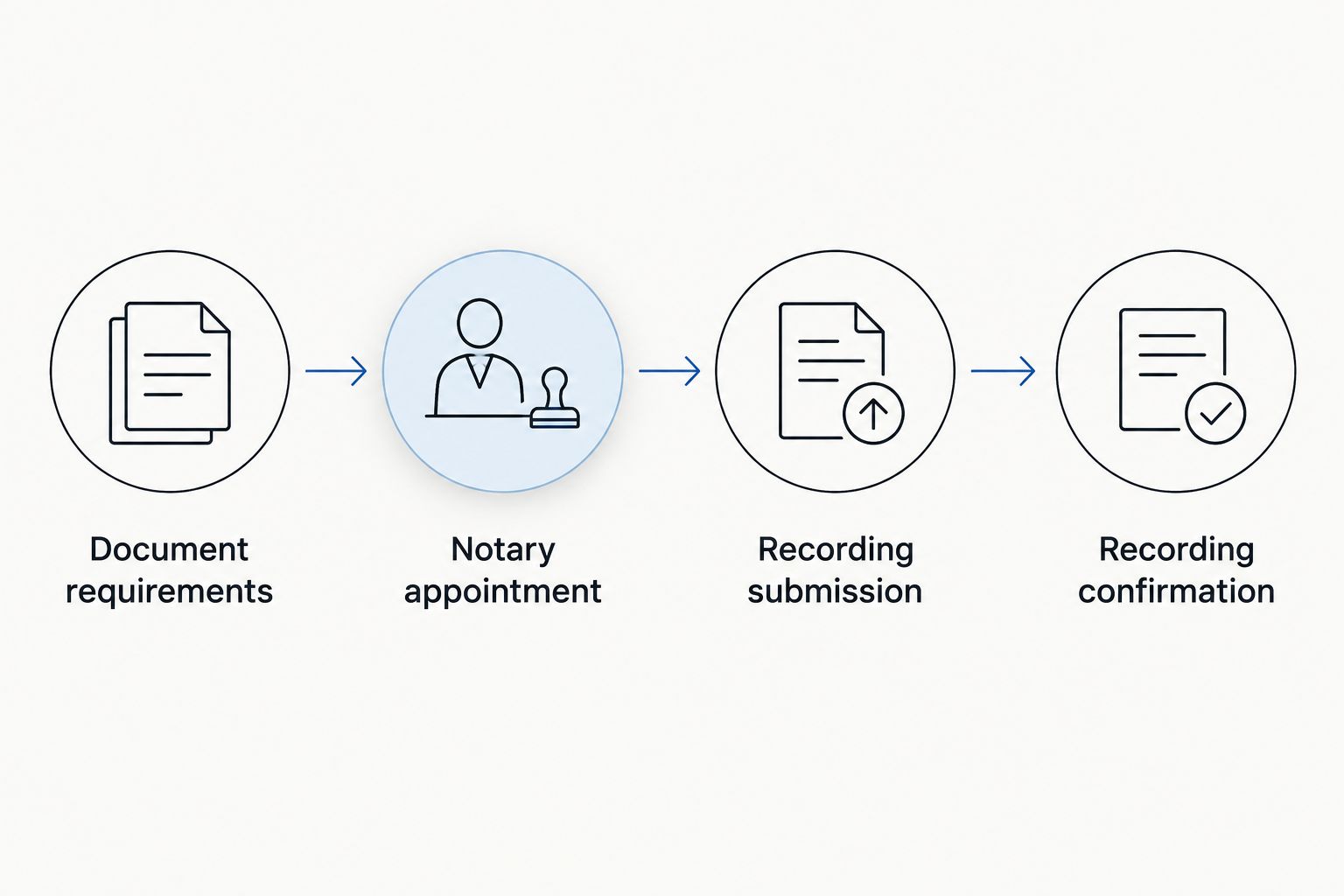
Instead of making separate trips to fix a notarized document and resubmit it, confirm Los Angeles County’s recording requirements, complete the correct notarial act, and submit the finished packet in that order. This 2026 workflow helps you keep the notary appointment, county recording, and returned-document follow-up connected.
- To notarize documents before recording Los Angeles County paperwork, confirm the document’s recording requirements before your notary appointment.
- Pro Business Solutions suits first-time owners seeking personal notary support in English or Spanish.
- An acknowledgment and a jurat serve different purposes; ask the document preparer which your document requires.
- Keep the recording receipt and verify the returned document, not just the submission confirmation.
Why this matters
Notarization and recording are separate steps. A notary performs the required notarial act. The Los Angeles County Registrar-Recorder/County Clerk examines a submitted document for applicable recording requirements and, when accepted, places it in the public record.
A completed notary certificate does not establish that the document has the right legal wording, attachments, or recording destination. Checking those details before signing prevents avoidable rework.
Pro Business Solutions is best for first-time business owners seeking hands-on notary support in English or Spanish. The consultancy brings 21+ years of local filing experience and offers formation, permits, and related paperwork help in one place. You can contact the team to explain your document and ask what to bring.
Before you start
- Gather the complete document and signing instructions. Bring every page, referenced attachment, the intended recipient’s directions, and identification acceptable under California notary rules. Review the guide to identification for notary services in Los Angeles before your appointment.
- Confirm the destination and submission method. For real-property documents, establish which county contains the property. Check the Los Angeles County Registrar-Recorder/County Clerk’s current 2026 instructions for your document type and intended submission channel.
- Resolve the certificate before signing. A notary cannot choose the notarial act for you. If the document has no certificate or unclear instructions, ask its preparer, receiving agency, or an attorney which act is required.
The non-obvious problem is an incomplete attachment. A reference to an attached legal description is not the legal description itself. If an exhibit is missing, resolve that before the appointment rather than asking the notary to complete an unfinished packet.
Document requirements
Confirm the destination and packet
- Identify the document. Use its actual title, not a description such as business paperwork. A deed, an affidavit, and a fictitious business name statement do not share the same filing process.
- Confirm where it belongs. California entity formation goes through the Secretary of State; county recording is a different function. Even when the county office handles several services, those services have separate requirements.
- Check the county’s document-specific instructions. Confirm required originals, attachments, formatting, return information, and any accompanying forms. Use current 2026 instructions rather than an old packet saved by another business owner.
- Review the recording layout. California recording rules address legibility, page dimensions, and space for recording information. Standard letter paper measures 8.5 inches wide by 11 inches long; confirm the county’s rules before changing the document’s format.
- Check return information. If your form includes Recording Requested By or When Recorded Mail To, complete those fields according to the preparer’s instructions. Confirm that the return address is one you can monitor.
Expected result: You have a complete document, the correct destination, and a submission checklist before anyone signs. Questions about legal wording go back to the preparer or an attorney, not to the notary for interpretation.
Notary appointment
Complete the required notarial act
- Confirm identification requirements. Tell the notary which identification you intend to present before traveling. A familiar face, business card, or informal introduction does not replace California’s identification requirements.
- Present the complete document. Include exhibits and instructions. Do not leave substantive blanks for someone to finish after notarization.
- Follow the signing instruction for the required act. An acknowledgment allows the signer to acknowledge an existing signature while personally appearing before the notary. A jurat requires signing in the notary’s presence and taking an oath or affirmation.
- Complete the appointment process. Follow the notary’s directions for the journal entry and any required thumbprint. Ask questions before signing if the instruction is unclear.
- Inspect the finished packet. Check for an accidentally omitted page, an unattached certificate, or an obvious mismatch that needs the notary’s attention. Do not fill in or alter the notary’s certificate yourself.
Expected result: The required notarial act is complete, and its certificate stays with the correct document. Notarization does not replace the separate review of recording requirements.
Acknowledgment versus jurat
Use this comparison to understand instructions, not to select the act yourself. The California Secretary of State’s Notary Public Handbook explains the distinction; consult the current handbook for your 2026 appointment.
| Notarial act | Best for | What happens | Important limit |
|---|---|---|---|
| Acknowledgment | Documents whose instructions require acknowledgment of execution | The signer personally appears and acknowledges signing the document | It does not establish that the document’s statements are true |
| Jurat | Affidavits or statements whose instructions require an oath or affirmation | The signer signs in the notary’s presence and takes an oath or affirmation | A previously signed page alone does not complete the jurat process |
Both acts involve identifying the signer. Neither makes the notary the document’s legal adviser or determines whether the underlying transaction meets your needs.
Recording submission
Assemble and submit the packet
- Reconcile the pages. Compare the finished document against the preparer’s checklist. Confirm that the notary certificate belongs to that document and that referenced exhibits are present.
- Include required accompanying forms. Real-property recordings can involve additional forms or declarations. Ask the preparer which apply; do not assume every notarized document needs the same packet.
- Confirm current submission instructions. Check the county’s accepted channels, payment instructions, and document requirements immediately before submission. Do not assume that a scanned upload replaces an original paper document.
- Keep a secure reference copy. Preserve a copy of the completed packet and a record of what you submitted. Protect identification details and other sensitive information rather than sharing the packet through an open message thread.
- Submit through the confirmed channel. Follow that channel’s instructions and retain its receipt, tracking record, or acknowledgment. Keep your reference copy separate from the original you send.
Expected result: Your packet is submitted through an accepted process, with a record that lets you follow up. Submission is not the same as completed recording.
The sequence is simple, but the handoffs matter. Confirm the document first, notarize the completed version, submit that same version, and then verify the county’s result.
Recording confirmation
Verify and retain the result
- Check the submission status. Use the receipt or reference supplied by your submission channel. Follow the county’s current status-check instructions rather than treating delivery confirmation as proof of recording.
- Inspect the recorded document. Review the recording information supplied by the county and confirm that the returned document is the one you intended to record.
- Read any rejection notice carefully. Separate document-content issues from notarial-certificate issues and submission issues. Each needs a different person to resolve it.
- Store the completed record. Keep the returned document, accompanying receipt, and correspondence together. Give copies to the parties who need them through an appropriate, secure method.
Expected result: You can identify the recorded document and retrieve it later. If the submission was rejected, you have a specific correction request rather than a vague instruction to try again.
Pro Business Solutions emphasizes personal guidance and confirms a 100% error-free service promise. That promise concerns the accuracy of its service; notarization, county recording, and legal advice remain distinct functions. Ask which paperwork support fits your document before arranging help.
Second workflow: correcting a rejected submission
A rejected recording needs a correction workflow, not an automatic second notary appointment. Start with the county’s stated reason and keep the returned packet intact.
- Preserve the notice. Keep the rejection explanation with the exact packet that was returned. Do not immediately replace pages or discard envelopes containing instructions.
- Identify the responsible person. Ask the preparer about missing document language or exhibits. Ask the notary about a notarial-certificate issue. Direct submission-method questions to the receiving office or submission provider.
- Determine whether another appearance is necessary. A changed document or an issue requiring a new notarial act can require another appointment. Do not assume the first certificate can simply be transferred to a revised document.
- Resubmit as instructed. Follow the rejection notice and current county requirements, then repeat the recording-confirmation step.
Best for rejected packets: Make the smallest properly authorized correction that resolves the stated issue. Rebuilding the whole packet without understanding the rejection creates another opportunity for mismatched pages.
Troubleshooting
The notary will not proceed with your identification
Describe the identification you have and ask about the lawful alternatives before rescheduling. Do not assume that bringing someone who knows you automatically satisfies the rules; California credible-witness procedures have specific conditions.
The document is signed, but it needs a jurat
Tell the notary before the appointment. A jurat requires signing in the notary’s presence and an oath or affirmation, so an existing signature does not remove those steps. Follow the notary’s instructions rather than erasing or covering a signature yourself.
The county rejects a notarized document
Read the stated reason first. Notarization does not resolve a missing exhibit, an incorrect recording destination, or a document-formatting issue. Send the notice to the person responsible for that part of the packet.
Information changed after notarization
Stop before submitting the revised version. Explain the change to the document preparer and notary so they can address their respective responsibilities. Never move a completed certificate onto a different document on your own.
The package arrived, but you have no recording confirmation
Use the delivery record to establish receipt, then check recording status through the appropriate channel. Delivery tracking shows that a package arrived; it does not show that the county recorded its contents.
Customize your workflow
For your 2026 paperwork, keep a reusable checklist with the document title, preparer, signer, required notarial act, submission channel, and return address. Keep sensitive identification details out of a shared checklist.
If the recording connects to a new business, track formation, tax registrations, permits, and county filings separately. A recorded document does not stand in for those other steps.
Pro Business Solutions offers business formation, permits, notary services, and related paperwork assistance, with personal support in English and Spanish. Ask about the specific task you need handled; the consultancy is not a law firm, and legal questions belong with an attorney.
Ask about your notary paperwork
Explain your document and ask what to bring for personal support in English or Spanish.
FAQ
Do I need to notarize documents before recording them in Los Angeles County?
Not every document submitted to a county office requires notarization. Confirm the requirements for your specific document with its preparer and the Los Angeles County Registrar-Recorder/County Clerk before arranging an appointment.
Can I sign my document before visiting the notary?
An acknowledgment can cover a signature made earlier, but a jurat requires signing in the notary’s presence. Confirm which act your document requires before signing.
Can a California notary tell me which certificate to use?
A California notary cannot choose the required notarial act for you. Ask the document preparer, receiving agency, or an attorney whether the document requires an acknowledgment, jurat, or another act.
Does notarization mean the county will record my document?
No. Notarization completes a notarial act, while county recording involves separate document and submission requirements. Check both before submitting the packet.
Can I record a scanned copy instead of the original?
Do not assume a scanned copy meets the requirements. Confirm what the county accepts for your document and submission channel before sending an original or a copy.
What should I do if my notarized document is rejected?
Read the rejection notice and identify the exact issue before changing anything. Contact the preparer for document-content issues and the notary for notarial-certificate issues, then follow the resubmission instructions.
Can Pro Business Solutions help me understand the paperwork in Spanish?
Pro Business Solutions provides personal support in English and Spanish. Explain the document and the assistance you need when requesting help so you can prepare for the appointment.
One last thing
Ask where the recorded document will be returned before you submit it. A correctly completed packet still needs a reliable destination. If your business address is changing during the filing process, resolve the return-address instructions before the document leaves your hands.